
Why Your Phone Won't Charge (and How to Fix It)
Phone will not charge? Work through these checks in order: cable, charger, lint in the port, software, then battery. Learn when it needs a port repair.
Charging · Oct 10, 2026 · Family Wireless Cell Phone Repair
Short answer: most phones that will not charge have one of five problems: a bad cable or adapter, lint packed into the port, a software glitch, a worn battery, or a damaged charging port. Work through them in that order, because the first two cost nothing. If you have cleared those, a charging port repair at Family Wireless in Dallas starts at $50 for iPhone 11 to 14 and is usually a same-day fix.
Step 1: Rule out the cable and charger
Try a different cable, a different adapter, and a different wall outlet. Use a wall adapter rather than a computer USB port, which can be too weak. Look at both ends of the cable for fraying, bent pins, or discoloration. Cheap or damaged cables are the most common cause of a phone that charges slowly or not at all, so this is always the first test.
Step 2: Check the port for lint
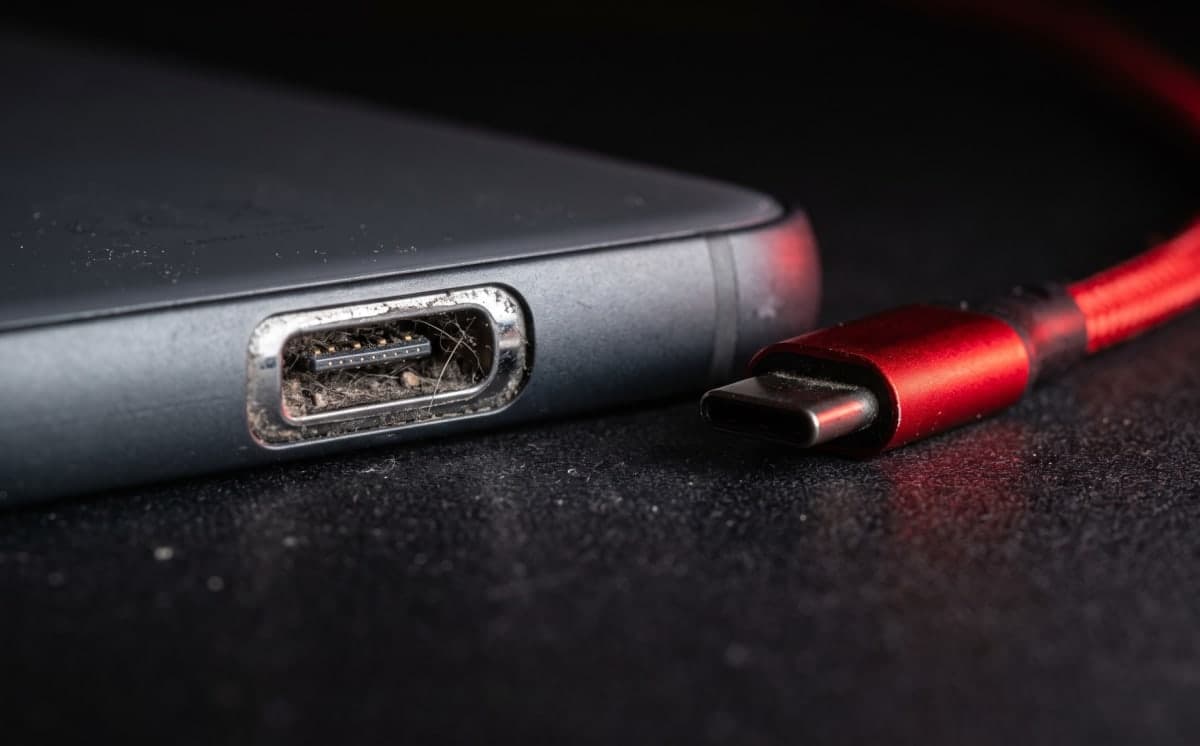
Shine a flashlight into the charging port. Pocket lint gets pressed in by the cable over months until it stops the plug from seating fully, and it is one of the most common causes we see. Turn the phone off and gently scrape the lint out with a wooden or plastic toothpick. Never use a metal pin or needle, which can damage the contacts or short them, and never push anything hard into the port.
Step 3: Restart the phone
A software hiccup can stop a phone from recognizing a charger. On an iPhone 8 or later, press and release volume up, then volume down, then hold the side button until the Apple logo appears. On most Samsung phones, hold power and volume down together for about ten seconds. Then plug in again.
Step 4: Look for a warning on screen
If the phone says charging is unavailable because liquid was detected in the connector, take it seriously and unplug it. That is a water problem, not a cable problem, and our guide on what to do after water damage explains what to do next. Also remember that an iPhone with Optimized Battery Charging can hold at around 80 percent overnight on purpose. That looks like it has stopped charging, but it is working as designed.
Step 5: Test wireless charging if your phone has it
If the phone charges on a wireless pad but not with a cable, the charging port is almost certainly the problem. If it will not charge either way, the battery or the board is more likely. Keep in mind that a shattered back can stop wireless charging, which we cover in is cracked back glass worth fixing.
Signs it is the battery, not the port
If the phone does charge but dies quickly, shuts off at 20 or 30 percent, or the case looks swollen, the battery is the likely culprit. Read how to know your battery needs replacing, or see what a replacement costs in our iPhone battery replacement cost guide.
When the port itself needs replacing
If a good cable and a clean port still will not charge the phone reliably, the port is worn or damaged. The classic signs are a phone that only charges at an angle, a cable that feels loose or falls out, a charge that connects and disconnects, or visible bent pins. We clean the port first, and if it still fails we fit a new port or dock assembly and test both charging and data transfer before you leave. Our October 2026 starting prices for iPhone are $50 for iPhone 11 to 14, $65 for iPhone 15 and 16, and $80 for iPhone 17. See what the repair includes on our charging port repair page.
What not to do
Do not force a plug that does not fit, do not use a metal tool to clean the port, and do not leave a phone charging if the cable or the phone gets hot. Stop using a cable that heats up or looks damaged.
Tablets and laptops
The same troubleshooting applies to tablets. If an iPad will not charge, we cover it in our iPad and tablet repair guide. A laptop that will not power on has a different set of checks, which we explain in why a laptop will not turn on.
Frequently asked questions
Why does my phone only charge at an angle? Usually the port is worn or has lint stopping the plug from seating. Clean it first, and if it still happens the port needs replacing.
Is it worth replacing the charging port on an older phone? Often yes, because a port repair costs far less than a new phone. We will tell you honestly if the phone is worth fixing.
Will fixing the port erase my data? No. Replacing the port does not touch your storage.
Do you charge to diagnose it? We offer free diagnostics, and we tell you whether it is the cable, the port, or the battery before any paid work starts.
Still not charging? Book a repair or walk in at 6102 Samuell Blvd #104, Dallas, Monday to Saturday, 8 AM to 7 PM. We will test the port and the battery and tell you which one it is.
Need this fixed today?
Book charging port repair and get a price before any work starts.