
How to Know Your Battery Needs Replacing
The clearest signs a phone battery is worn out, how to check battery health on iPhone and Android, and the swelling warning you should never ignore.
Battery · Oct 10, 2026 · Family Wireless Cell Phone Repair
Short answer: a battery that needs replacing usually shows up as one or more of these: it drains much faster than it used to, the phone shuts off with charge left, it runs warm during light use, or the percentage jumps around. On an iPhone you can check by opening Settings, Battery, Battery Health and Charging, and looking at Maximum Capacity. Under about 80 percent most people feel the difference. A swollen battery is the one sign that cannot wait. At Family Wireless in Dallas, iPhone battery replacement starts at $50 and is usually a same-day job.
It dies much faster than it used to
If a phone that once lasted all day is empty by mid-afternoon, the battery has aged. Batteries wear with every charge cycle. Apple designs iPhone batteries to keep around 80 percent of their capacity for roughly 500 full charge cycles on older models and 1,000 on the iPhone 15 and newer, and other phones are similar. After that the loss gets noticeable.
It shuts off with charge left
A phone that powers off at 20 or 30 percent, especially in the cold or when you open the camera, has a battery that can no longer deliver power under load. On an iPhone, iOS can slow the phone down to avoid these shutdowns, and you may see a note about this under Battery Health and Charging. A fresh battery removes that limit.
It gets warm during normal use
Some warmth is normal during fast charging or heavy tasks like gaming. A phone that gets properly warm while idle or doing light things, or that feels hot to hold while charging, is a warning sign. If it is very hot, unplug it and let it cool.
The percentage jumps around
Dropping from 40 to 15 percent in a few minutes, or sitting at 1 percent and then dying, means the battery gauge can no longer read a worn cell accurately. We recalibrate after a new battery so the percentage reads correctly again.
Swelling: stop charging and bring it in
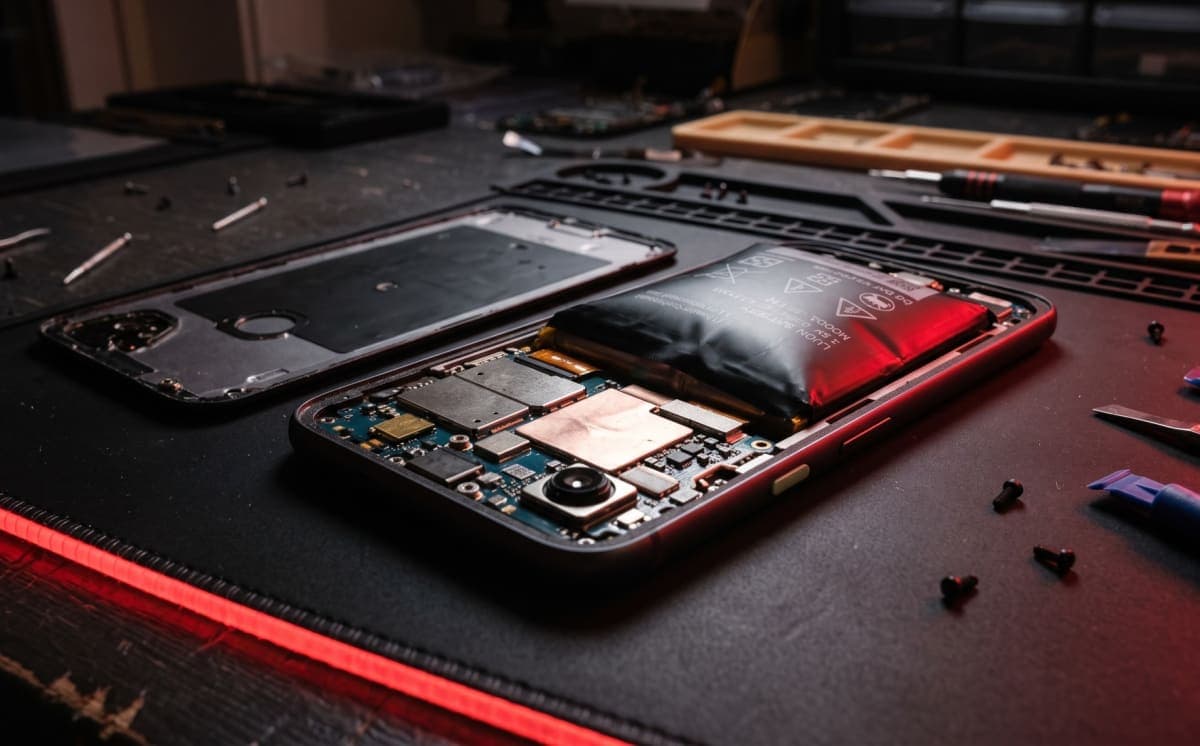
This is the one not to wait on. If the screen is lifting at an edge, the back no longer sits flat, or the phone rocks on a table, the battery may be swelling. Stop charging it, do not press on it or try to flatten it, and bring it in. A swollen cell can push the display out and is a safety risk, so it is a shop job, not a wait-and-see problem.
How to check battery health
On an iPhone, go to Settings, Battery, Battery Health and Charging, and read Maximum Capacity. On Android, many newer phones list battery health under Settings, Battery, and if yours does not, bring it in and we will test it. Remember that the number is not the whole story. A phone at 85 percent that still shuts off suddenly can need a battery more than one at 78 percent that behaves normally.
Is it the battery or something else?
Fast drain is not always the battery. A nearly full storage, a recent software update that is still settling, high screen brightness, or one misbehaving app can all drain a phone. A quick test is to leave it idle on Wi-Fi with low brightness. If it still loses charge quickly, suspect the battery. If it charges slowly or only at certain angles, the problem may be the port instead, which we cover in why your phone will not charge.
What replacement involves and what it costs
Replacement is usually done the same day. Your photos, apps, and settings stay exactly as they are. Our October 2026 starting prices for iPhone are $50 for the iPhone 11, 12 and 13, $60 for the iPhone 14, 15 and 16, and $85 for the iPhone 17, with Pro Max models from $70 and the iPhone 17 Pro Max from $95. We check your battery health first and confirm the exact price before any work starts. Read the full breakdown in our iPhone battery replacement cost guide, or see what the service covers on the phone battery replacement page.
Is a new battery worth it?
If the phone still does what you need and the battery is the only complaint, a new battery is the cheapest way to get another year or two from it, and you keep your data, case, and number. If you are buying a used phone instead, battery health is the first thing to check, as we explain in our refurbished iPhone buying guide. Tablets wear out the same way, and our iPad and tablet guide covers that.
Frequently asked questions
How long does a phone battery last? Most phones show noticeable wear after a couple of years of daily charging, depending on how hard the phone is used and how hot it runs.
Will a new battery erase my phone? No. Replacing the battery does not touch your data. A quick backup is still good practice.
Can I keep using a phone with a worn battery? Yes, if it is only short on runtime. If it is shutting off unexpectedly or the case is swelling, stop and have it checked.
Is it safe to charge a swollen phone? No. Stop charging it and bring it in.
Not sure if it is the battery? Book a repair or walk in at 6102 Samuell Blvd #104, Dallas, Monday to Saturday, 8 AM to 7 PM. We will check battery health first and quote before any work.
Need this fixed today?
Book phone battery replacement and get a price before any work starts.